What's left of Meta targeting, and how to use every bit of it
Very little, and it is all hard targeting: age, gender, location down to PIN code, account-level placement controls, and value rules that bid more or less for the people, places and devices you care about. Interests, behaviours and most detailed targeting are suggestions Meta can ignore. The rest of your targeting now lives in the creative.
Every few months Meta removes another targeting setting and calls it an improvement. Interests became suggestions. Lookalikes became suggestions. In August 2026 Meta started telling advertisers that “excluding placements, platforms, devices and operating systems will no longer be available for your ad sets.”
So it is worth asking plainly: what is left that Meta has to obey? Not much. But what is left is powerful, and most accounts we audit use almost none of it.
What is hard targeting and what is soft targeting?
Hard targeting is a limit Meta must respect. If you say 35 to 54, nobody aged 25 sees the ad. Soft targeting is a hint. With Advantage+ audience on, Meta treats your interests, behaviours and audience suggestions as a starting point and goes past them whenever it expects a better result.
Here is the split as it stands in October 2026.
| Setting | Hard or soft | Where it lives |
|---|---|---|
| Location, minimum age, language | Hard | Ad set, audience controls |
| Age range and gender | Hard only with original audience options; a suggestion under Advantage+ audience | Ad set |
| Placement exclusions | Hard | Ad account, Advertising settings |
| Value rules (bid up or down by segment) | A weighting | Ad set, or account default |
| Interests, behaviours, household income | Soft | Ad set, audience suggestions |
| Lookalikes and custom audience suggestions | Soft | Ad set, audience suggestions |
Everything in the soft rows is now done better by the creative. The ad itself, its hook, its language, the person in it, is the targeting Meta actually reads. More on that at the end.
How do you control age, gender and location?
Open any ad set with Advantage+ audience on and the Audience section is split in two. Meta’s own wording tells you which half it obeys.
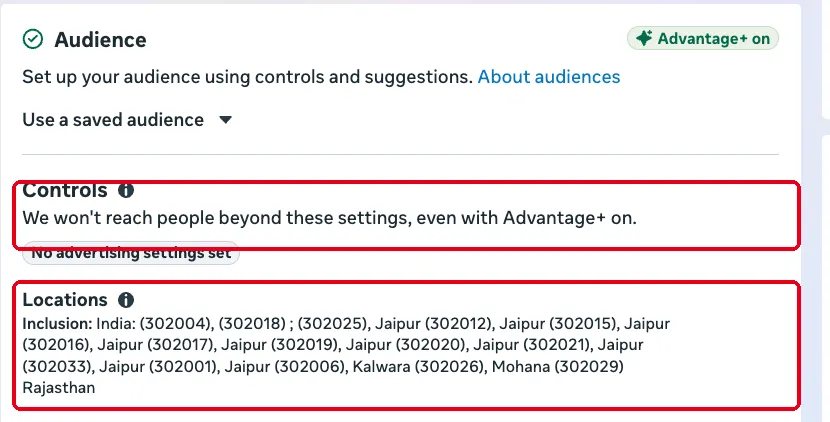
- Open the ad set and scroll to Audience. The top block is Controls: “We won’t reach people beyond these settings, even with Advantage+ on.”
- In Locations, type a city, or a PIN code for India, and choose Include. Use Exclude to cut areas you cannot serve.
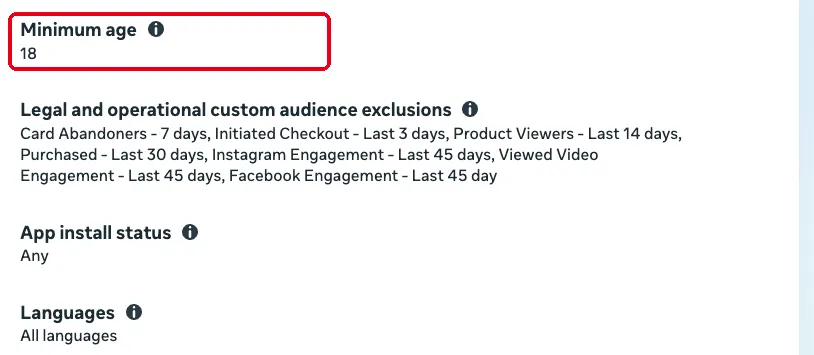
- Set Minimum age in the same block. It is a hard floor. Exclusions of custom audiences (past buyers, for example) and Languages sit here too, and they bind as well.
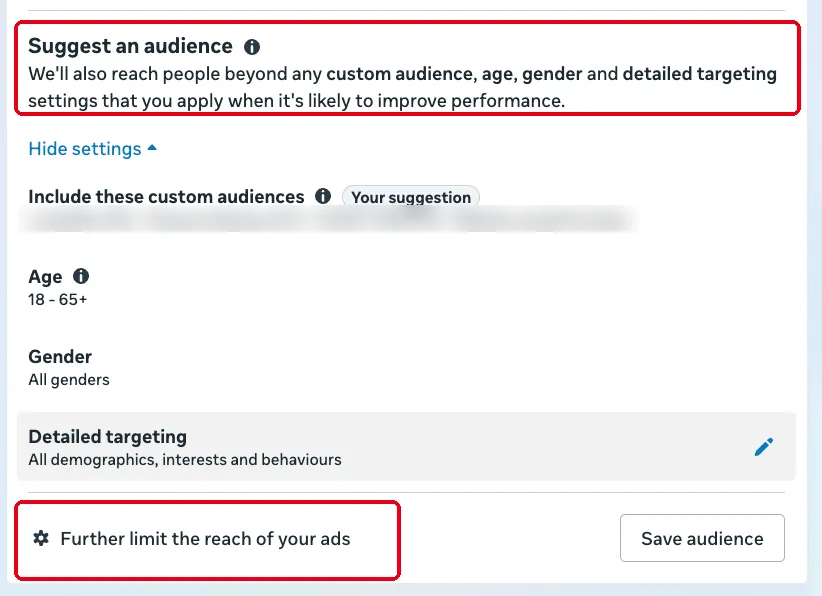
- Now look at the block below, Suggest an audience. Meta says it plainly: “We’ll also reach people beyond any custom audience, age, gender and detailed targeting settings that you apply when it’s likely to improve performance.” Your age range and gender live here, so they are hints.
- If you must hold a hard age ceiling or a single gender, click Further limit the reach of your ads at the bottom. Accept that it narrows the auction and usually raises cost.
If you would rather keep Advantage+ audience on and still favour an age band or a gender, that is what value rules are for.
Location is the strongest control of all for a local business. A PIN code list is the closest thing Meta still offers to choosing the neighbourhood, and therefore the income level, of the person who sees your ad.
How do you pay more for the customers who are worth more?
This is where most accounts leave money on the table. Say women aged 35 to 44 buy more often, or spend more per order, than anyone else. You do not have to restrict the ad set to them. You can tell Meta they are worth more, and Meta will bid harder to reach them while still showing your ads to everyone else.
That is a value rule. Each rule can combine up to two criteria, and it raises the bid by up to 1,000% or lowers it by up to 90%. Under Audience the criteria are age, gender, device platform (desktop or mobile), mobile operating system (iOS or Android), location (towns and cities, regions and states, countries) and audience labels, which let you bid more for a custom audience you have labelled. Under Placement you can pick Facebook Feed, Stories and Reels, the same three on Instagram, and Audience Network. Only the first matching rule applies, so put the most specific rule at the top.
- In the ad set, open Value rules. Under Rule set, pick an existing set or click Create a rule set.
- Choose Audience, then Age, pick 35 to 44, click Add criteria, add Gender: women, and set Increase bid by 20%.
- Add any others, for example a lower bid for the age band that never buys.
- Name the rule set, tick Use as preferred rule set if it should be the default for new ad sets, and click Create.
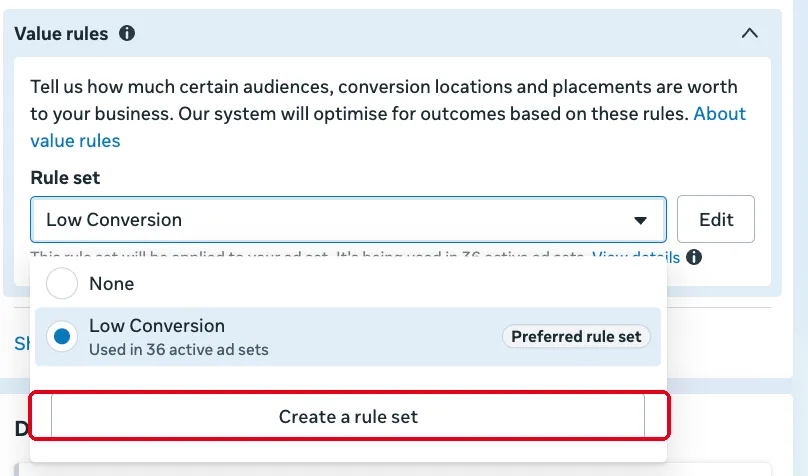
You do not have to repeat this in every ad set. Set a rule set once in Advertising settings (next section) and mark it as the preferred rule set; new ad sets pick it up by default. In our own account, one preferred rule set now runs across 36 active ad sets.
Start small. Meta warns that cost per result can rise when value rules are on, because you are telling it to pay more for some people. That is fine if they really are worth more. Check it by comparing revenue per purchase for the segment, not just cost per purchase.
How do you control placements now that the ad set option is going?
On campaigns where Meta has rolled the change out, you can no longer untick Audience Network or Messenger inside the ad set. What is left lives one level up, in Advertising settings, and applies to every ad set in the account.
- In Ads Manager, open the menu and go to Advertising settings.
- Under Shortcuts, click Placement controls (“Set where you want your ads to appear”). Untick the placements you never want, such as Audience Network, and save.
- Under Your business, Account controls holds the same limits alongside account-wide audience limits, and Value rules is where you set the default rule set for every new ad set.
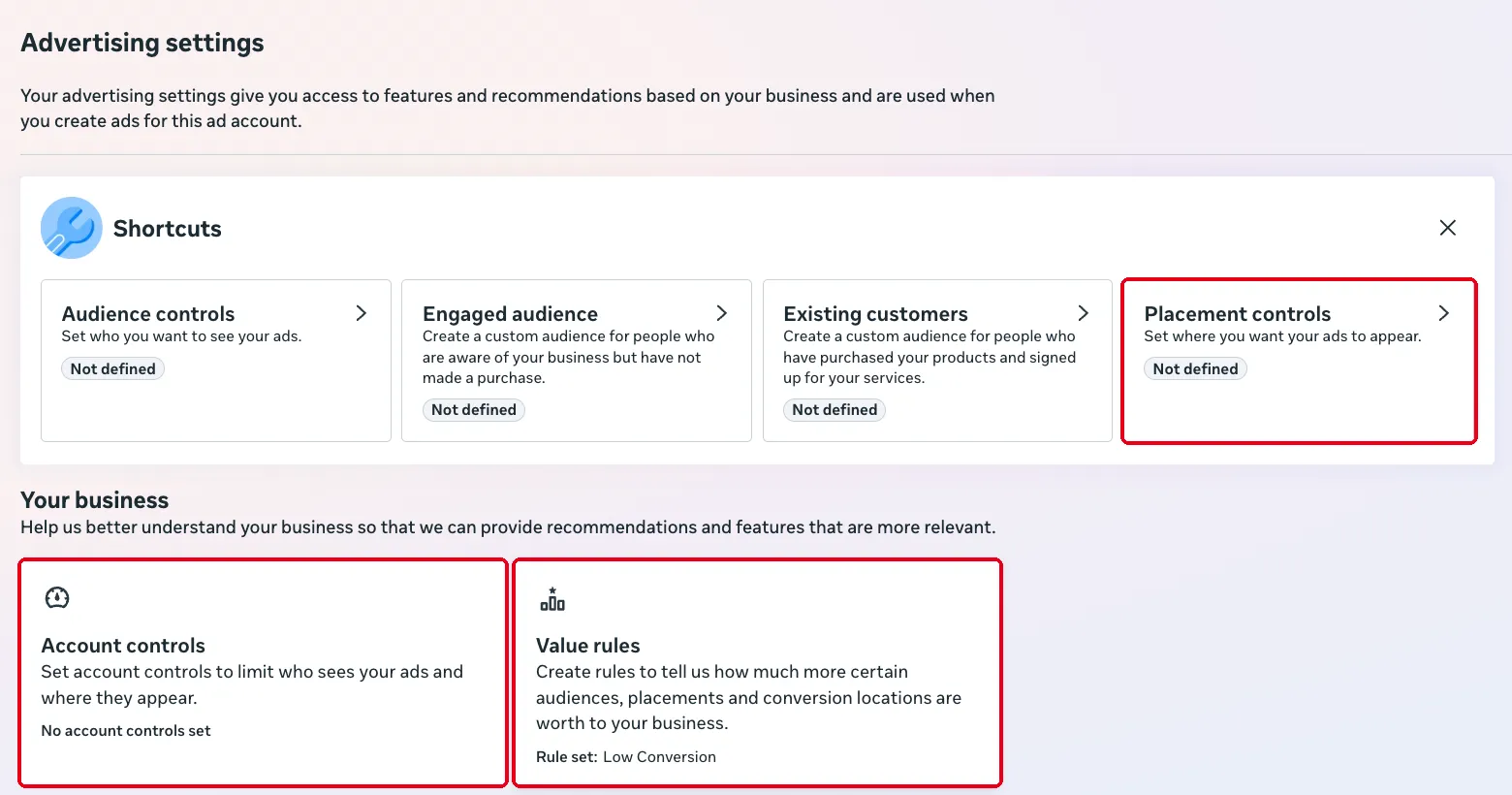
Set it once and every future ad set inherits it, so nobody on the team has to remember.
For a single ad set, as a weighting. Value rules can also take placement, device type and operating system as conditions. Bid a placement down by 90% and Meta will rarely win it. Rarely is not never, which is why an exclusion you truly need belongs in the account settings, not a value rule.
How do you reach people with money?
There is no “rich” button. There are three proxies, and only one of them is hard.
Location, hard. Include the PIN codes and neighbourhoods where your best customers live, and nothing else. Meta has to respect it.
The phone they carry, a weighting. Operating system used to be a hard filter in the ad set; on ad sets where Meta has removed device and OS exclusions, it no longer is. What still works is a value rule: Audience, Mobile operating system, iOS, increase bid by 30%. In India an iPhone is a strong signal of spending power, and the rule tells Meta to fight harder for those people without shutting Android out.
Household income, soft. Meta has quietly added household income brackets in India under detailed targeting (Demographics, Financial, Household Income: top 10%, 11 to 20% and so on). It is still detailed targeting, so with Advantage+ audience on it is a suggestion Meta can go beyond. Meta has not published how it estimates income in India, so treat it as a hint and judge it on cost per purchase and order value.
Where does the rest of your targeting go?
Into the creative. If Meta is going to ignore your interests anyway, the ad has to say who it is for. A 40-year-old founder in the opening frame, a ₹4,000 price on screen, Hindi in the first line, a South Delhi landmark in the background: each of those tells Meta who to show the ad to, and tells the wrong person to scroll past.
So the job in 2026 is two jobs. Set the few hard limits properly, once, and weight the auction towards the customers worth more. Then make enough different creatives that each one finds its own audience.
More on structure and budgets sits under paid media and scaling with ads.
Ask me anything about this post
Frequently asked questions
Can I still exclude placements on Meta ads?
Not in the ad set, on the campaigns where Meta has rolled the change out. Meta's notice in Ads Manager reads "Excluding placements, platforms, devices and operating systems will no longer be available for your ad sets." You can still block placements for the whole ad account under Advertising settings, Placement controls, and you can bid placements down with a value rule.
What is the difference between hard and soft targeting on Meta?
Hard targeting is a limit Meta must respect: location, minimum age, language and account-level placement controls. Soft targeting is a suggestion: with Advantage+ audience on, Meta treats interests, behaviours and audience suggestions as a starting point and goes beyond them when it expects better results.
Can I target only iPhone users on Meta?
As a hard filter, no longer, on ad sets where operating system exclusions have been removed. The way to lean towards iPhone users now is a value rule that bids more for iOS, so Meta pays more to win those people without shutting Android out completely.
Do value rules cost more?
They can. Meta warns that cost per result may rise when you use value rules, because you are telling it to pay more for some people. Start with a small uplift, compare cost per purchase and revenue per purchase for the segment, and raise it only if the segment really is worth more.
Sources
- Meta Is Removing Placement Controls From Ad Sets — Jon Loomer Digital, accessed 23 Oct 2026
- Meta Removed Placement Controls From Ad Sets. Value Rules Are Not a Replacement. — AdRiseLab, accessed 23 Oct 2026
- Meta value rules now available for placement-specific bidding control — PPC Land, accessed 23 Oct 2026
- Meta Launches Household Income Targeting in India — Vaizle, accessed 23 Oct 2026
Related reading
-
You can now pick age and gender per creative inside one Meta ad set
Meta's new "Choose an audience for each ad creative" lets one ad set aim each creative at its own age and gender. How it works, its limits and when to use it.
-
27 Meta ad formats you've never used, with real examples
Twenty-seven creative formats for Meta ads, from blind tests to notes app ads, each with a real ad that brands kept running for 60 days or more.
-
Your Meta frequency and device reports may be empty without warning
Since 6 August 2026 three Meta Insights breakdowns return no data unless an admin opts the ad account in. Which ones, how to check, and how to fix it.
Ask this site
Answers are generated from published posts on this site only. Check the cited post before acting on anything.