Meta shows results per creative asset. Here's how to read it.
In Ads Manager, open the Ads tab, click Breakdown, then Creative and Media for images and videos. Use it to decide what to make more of, not what to pause: Meta puts most spend behind the asset it expects to win, so small assets rarely get a fair test.
Put five images, three videos and four headlines into one Meta ad and let Meta mix them, and for a long time you could not tell which piece did the work. Now you can. Ads Manager has a Creative breakdown that shows spend and results for each asset inside the ad.
It is one of the most useful reports in the account, and one of the easiest to misread.
Where do you find it?
- Open Ads Manager and go to the Ads tab. It works best at ad level.
- Click Breakdown (between Columns and Reports).
- Choose Creative, then Media, to see each image and video. Hover over a thumbnail to preview it.
- For headlines and primary text, use the Dynamic Creative Element breakdown instead.
You get spend, impressions, clicks, click-through rate and results for each asset, and cost per result for the conversions you optimise for. It covers ads that hold several assets, such as flexible format ads and dynamic creative, plus Advantage+ creative enhancements. Some guides report it does not yet work for ads shown as a carousel or a collection.
Why is it so easy to misread?
Because Meta does not split the money evenly. It puts most of the budget behind the asset it predicts will win, early and fast. So the table almost always looks like this:
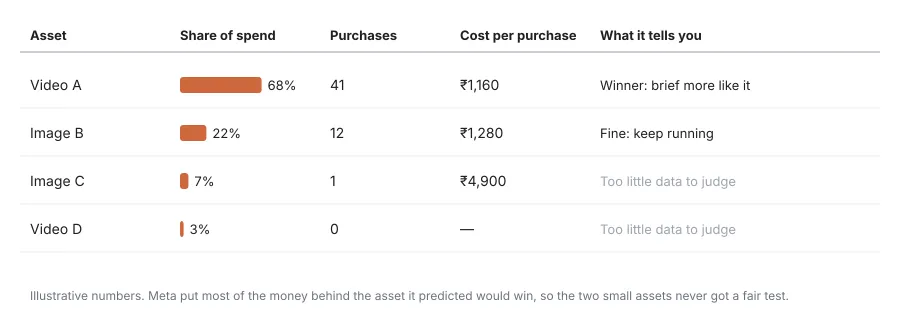
Image C looks terrible: one purchase at ₹4,900. But it only got 7% of the money. It did not lose a fair fight; it never had one. Pause it and you have learned nothing, except that Meta did not pick it first.
Two more things to keep in mind:
- The asset numbers do not always add up to the ad total. Compare assets with each other, not with the ad.
- An asset wins in this mix, with these other assets. Move it into a different ad and the result can change.
What should you do with it?
Brief more of what wins. This is the real value. If one video takes most of the spend and holds its cost per purchase, that is Meta telling you what your buyers respond to. Look at its hook, its first three seconds, the person in it, the offer. Make three new versions of that idea, in different ad formats.
Keep the ones that are fine. An asset with a fair share of spend and a cost per result close to the winner is pulling its weight. Leave it.
Rarely pause. Only call an asset a loser once it has had real spend and something like 30 to 50 conversions, and its cost per result is still clearly worse. Below that, the number is noise.
Watch for fatigue. Check the breakdown once a week. When the winning asset’s click-through rate starts to slide and its cost per result rises, it is wearing out. That is the moment to bring in the new versions you briefed.
Do not chase every small asset. Assets stuck under about 5% of impressions are not being tested. Replace them with new ideas rather than waiting for them to wake up.
How does this fit with the rest of your reporting?
Asset breakdowns tell you which creative works. They do not tell you whether the people it brought in actually bought, came back or were worth the money. For that you need Meta to learn from what happens after the click, which we cover in teaching Meta which leads are good. And if your other breakdowns have gone quiet, check whether your account needs the opt-in described in why your Meta frequency and device reports may be empty.
Ask me anything about this post
Frequently asked questions
Where is the creative asset breakdown in Ads Manager?
On the Ads tab, open Breakdown and choose Creative, then Media, for images and videos. Headlines and primary text sit under the Dynamic Creative Element breakdown. It works best at ad level.
Which ads does it work for?
Ads with several assets in one ad, such as flexible format ads and dynamic creative, plus Advantage+ creative enhancements. Some guides report it does not yet cover ads shown as a carousel or a collection.
Should I pause assets with a high cost per result?
Rarely, and only after they have had real spend. Meta concentrates budget on the asset it predicts will win, so a small asset with a poor cost per result may simply not have been tested. Wait for something like 30 to 50 conversions before calling an asset a loser.
Do asset-level numbers add up to the ad total?
Not always. Each asset's numbers are useful on their own, but adding them up can come out above or below the ad's total, so compare assets with each other rather than with the ad.
Sources
- Asset feed spec insights — Meta for Developers, accessed 6 Nov 2026
- Meta unveils creative breakdown for flexible formats and AI-generated image ads — PPC Land, accessed 6 Nov 2026
- Meta just unlocked creative-level reporting in Ads Manager — Common Thread Collective, accessed 6 Nov 2026
Related reading
-
Meta's Customer Lifecycle Strategy: stop paying for customers you have
Meta's Customer Lifecycle Strategy lets you mark an ad set as acquisition and exclude existing customers. How it works and how to feed it good data.
-
Optimising Meta for leads is the most expensive cheap thing you can do
Cheap leads teach Meta nothing. How we send qualified and purchase events back through the Conversions API so Meta learns which leads actually buy.
-
Meta's creative diversity score: what Low, Medium and High mean
Ads Manager now rates each ad set's creative diversity as Low, Medium or High. How it is worked out, what it misses, and how much to care.
Ask this site
Answers are generated from published posts on this site only. Check the cited post before acting on anything.